
Backup & restore for your Adobe setup <3
Never ever lose your workspacespreferences
Aether packs your Adobe apps' settings, presets, plugins, extensions and more into a single file, then restores them on your new computer or a fresh OS install. Works on Mac or Windows.
Works with After Effects, Illustrator, Media Encoder, Photoshop and Premiere. More coming.
What is Aether?
Aether helps you through one of the most stressful and tedious moments for every creative: migrating all your stuff to a new computer or fresh OS install.
If you use Adobe apps, you've probably spent years customizing everything about them. Adding brushes, palettes, scripts, actions, plugins... Everything so that each app feels like home every time you open it.
Aether scans your Adobe files, puts everything you need inside a zip, and lets you restore everything into the new install like nothing ever happened.
New computer, same experience.
Oh, and it mostly works from Mac to Windows, or back, too.
How it works
Three steps. No manual digging through preference folders.
Scan your system
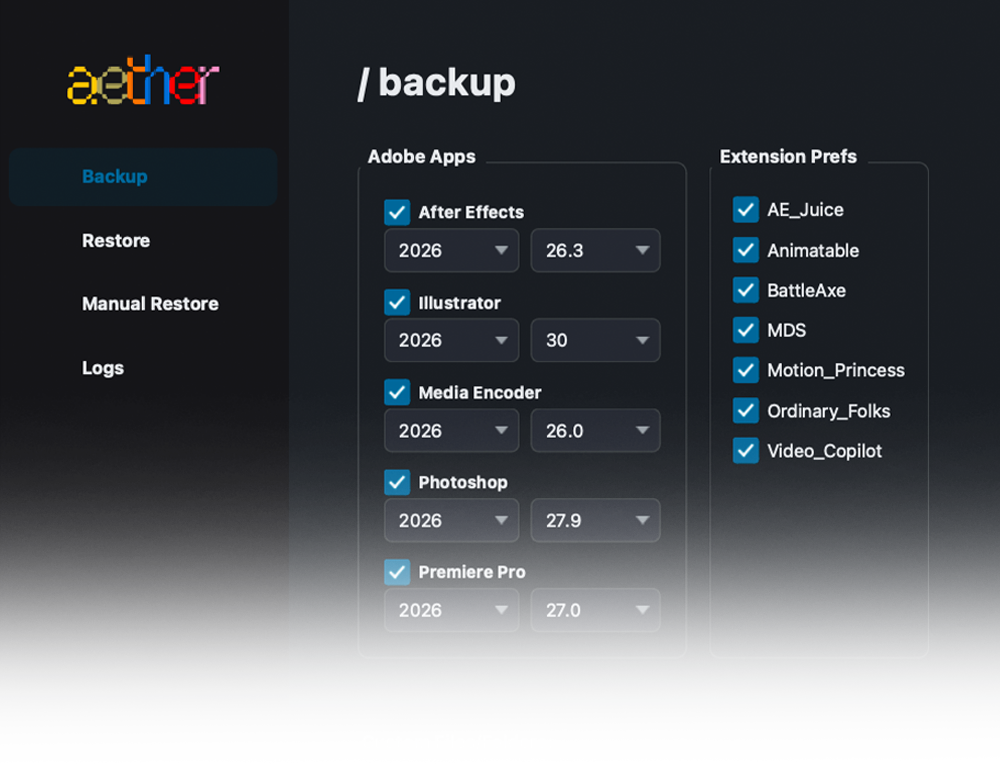
Aether scans your system and shows you everything available for backup.
Select & back up
Select your apps and extensions preferences, create your zip, and copy it to your new machine or fresh OS install.
Restore
Load your ZIP back into Aether and restore everything to where it belongs.
What's backed up?
Honestly, a lot. Most add-ons or customizations are covered by Aether.
| After Effects | Premiere Pro | Photoshop | Illustrator | Media Encoder |
|---|---|---|---|---|
| Workspace layouts | Workspace layouts | Workspace layouts | Workspace layouts | Workspace layouts |
| Preferences | Preferences | Preferences | Preferences | Preferences |
| Keyboard shortcuts | Keyboard shortcuts | Keyboard shortcuts | Keyboard shortcuts | CEP / UXP extensions |
| CEP / UXP extensions | CEP / UXP extensions | CEP / UXP extensions | CEP / UXP extensions | Plugins |
| Plugins | Plugins | Plugins | Plugins | Encoding presets |
| Scripts | Presets (.prfpset) | Camera Raw presets | Brushes | Ingest presets |
| ScriptUI panels | MOGRTs | Camera & lens profiles | Patterns | Watch folders |
| Presets (.ffx) | Color LUTs | Camera Raw defaults & curves | Gradients | |
| User Libraries | Lumetri Look presets | Brushes | Swatches/color libraries | |
| Caption/subtitle styles | Patterns | Actions | ||
| VST / VST3 audio plugins | Gradients | New-doc presets | ||
| Styles | Symbols | |||
| Swatches/color libraries | Graphic styles | |||
| Actions | Character & paragraph styles | |||
| Tool presets | ||||
| Custom shapes | ||||
| Contours | ||||
| Adjustment presets | ||||
| New-doc presets | ||||
| Character & paragraph styles |
Extension Preferences
Ok, teeny tiny confession.
For a complete restore, we also have to backup your extension's preferences, but some extensions store these outside of the standard Adobe folders, which sadly means that Aether doesn't know how to find those preferences.
That doesn't mean your extensions won't come through, but they will come without their own settings and customization, just like when you first installed them.
Unless, of course, we wrote special logic for each extension. Which is totally crazy. So that's exactly what we're doing!
With your feedback, we want to slowly build a massive support list so most major extensions are fully backed up too.
For now, we support a somewhat modest list:
Mac ↔ Windows
Backup on Mac, restore on Windows? Absolutely.
Windows to Mac? Yup.
Aether knows exactly where everything goes on each OS, and skips anything that shouldn't cross over.
No worries though, most things are compatible :)
Frequently asked questions
Get Aether
One-time purchase. No subscription.
Secure checkout via Lemon Squeezy.